How I Turned a Jetson Nano Into a Home Server
A board the size of a coaster now blocks ads for my whole house, hosts my own private cloud, and lets me reach both from anywhere, on about 5 watts.
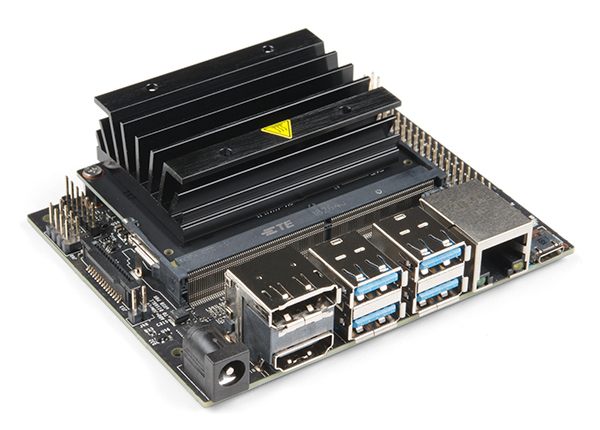
What it does
 Blocks ads everywhere. Pi-hole filters ads and trackers at the DNS level, so every device on the network is covered, including phones, smart TVs, and consoles, with nothing to install on them.
 Hosts my files. Nextcloud gives me a private Google Drive with a web UI and desktop and mobile sync, backed by a 500GB SSD.
 Works from anywhere. Tailscale connects my devices over an encrypted WireGuard VPN, so all of it is reachable when I'm away from home.
The hardware
| Board | NVIDIA Jetson Nano Developer Kit, 4GB |
|---|---|
| CPU | Quad-core ARM Cortex-A57 @ 1.43 GHz |
| GPU | 128-core NVIDIA Maxwell |
| Memory | 4GB 64-bit LPDDR4 |
| Boot drive | 16GB microSD |
| Storage | 500GB USB SSD |
| Network | Gigabit Ethernet, wired for reliability |
| Power draw | ~5W, running 24/7 |
How it fits together
Storage first
The Nano boots from a 16GB microSD card, which fills up fast. A 500GB USB SSD holds everything else: Docker images, Pi-hole data, and Nextcloud files. It mounts automatically at boot, and the Nano still starts normally if the drive is ever unplugged.
Docker for the services
Pi-hole and Nextcloud each run in their own container, with Docker's storage moved to the SSD. One Jetson-specific gotcha: the Nano's older 4.9 Linux kernel conflicts with Docker's default security (seccomp) profile, so containers need that profile relaxed to start.
Pi-hole
Ubuntu's built-in DNS resolver already uses port 53, so it has to step aside before Pi-hole can take over. My ISP router doesn't allow custom DNS, so I point each device at the Nano directly and keep a public resolver as a fallback in case the Nano goes offline.
Nextcloud
Nextcloud replaced an older Samba share. I moved the existing files into it, let it index them, and checked a sample of documents and photos before retiring the old share.
Tailscale
Tailscale needs no port forwarding or router changes, which makes it ideal behind a locked-down ISP router. Magic DNS gives the Nano a readable hostname with real HTTPS certificates, so I never type an IP address. Connections are peer-to-peer, so speed is limited mainly by my home upload bandwidth. The free plan covers up to 100 devices.
At a glance
| Service | Role | Runs in |
|---|---|---|
| Pi-hole | Network-wide DNS ad blocker | Docker |
| Nextcloud | Private cloud storage and sync | Docker |
| Tailscale | WireGuard VPN with Magic DNS | Host |
The verdict
For about $100 (board plus SSD), I have a quiet, always-on server that blocks ads on every device, serves my files over HTTPS, and is reachable from anywhere, with no port forwarding and no dynamic DNS.
Want the exact commands? The full step-by-step setup is in my what-i-use repository.