


Austin, TX · Senior Software Engineer

7+ years building production software for simulation, automation and developer tooling. I maintain PyMechanical and contribute to the PyAnsys open-source ecosystem.

Featured Projects

All projects →

Lorem ipsum dolor sit amet, consectetur adipiscing elit.

PyMechanical

PyAnsys open-source Python library enabling programmatic access to Ansys Mechanical for simulation workflows.

Open source

Lorem ipsum

Lorem ipsum dolor sit amet, consectetur adipiscing elit. Sed do eiusmod tempor incididunt ut labore et dolore magna aliqua.

Lorem ipsum

Lorem ipsum

Lorem ipsum dolor sit amet, consectetur adipiscing elit. Sed do eiusmod tempor incididunt ut labore et dolore magna aliqua.

Lorem ipsum

Latest from the Blog

All posts →

Notes from my home lab, side projects, and things I've learned along the way.

Sync Obsidian Across Every Device for Free with GitHub

One private Git repo keeps my notes in sync on PC and iPhone, with no subscription.

Productivity

How I Turned a Jetson Nano Into a Home Server

Network-wide ad blocking, a private cloud, and remote access, all from a ~5W board on my desk.

Home lab
About

Hi, I'm Dipin.

Portrait of Dipin Nair

I'm a Software Engineer with 7+ years of experience building production-level Python and C++ software for simulation, automation and developer tooling.

I maintain PyMechanical and contribute to the PyAnsys open-source ecosystem, with ownership across testing, releases, CI/CD and documentation. I focus on scalable Python platforms, open-source tooling and reliable customer-facing software.

PythonC++C#PyMechanicalDockerCI/CD

Work Experience

View resume · Download PDF →

From automotive transmissions to open-source simulation tooling. Tap a role for details.

Senior Software EngineerSynopsys Inc.
2023 – present
  • Architected and maintained PyMechanical, a PyAnsys open-source Python library enabling programmatic access to Ansys Mechanical.
  • Engineered Docker-based containerization and Azure DevOps CI/CD pipelines, reducing release cycles by 30% across Windows and Linux platforms.
  • Developed unit and integration testing frameworks, increasing automated regression coverage from 70% to 90%.
  • Resolved critical production bugs in ANSYS Mechanical core software (C++/C#) and improved customer-facing workflow reliability.
Software Developer InternAnsys Inc.
2023
  • Contributed ANSYS Mechanical release features with the Linear Dynamics team, supporting production C++/C# development workflows.
  • Validated changes through Windows/Linux developer builds, Azure pipelines, and ARM tests before integration.
  • Applied COM principles to extend Mechanical interfaces and partnered with test teams to triage defects and document release functionality.
Robotics Research AssistantProcter & Gamble
2021 – 2022
  • Automated fragrance consumption analysis for 600+ air fresheners using robotic batch testing workflows.
  • Enabled robot weighing, QR-code computer vision, and validated data uploads to Siemens server workflows.
  • Created a Python PyQt GUI to improve customer interaction and standardize test execution.
Systems EngineerTata Consultancy Ltd
2019 – 2020
  • Earned Design for Six Sigma Black Belt certification by supervising 2 projects as team leader and facilitator.
  • Coordinated development of 12 efficiency modules in MASTA software using C++.
  • Led a cross-functional team of 4 to automate meshing in SimLab using JavaScript for simulation analysis.
Senior EngineerGeneral Motors
2016 – 2019
  • Automated Abaqus system modeling with VBA scripting, reducing manual effort by 85%.
  • Earned 7 recognitions, including Work of Wonder and Pat on the Back, for transmission efficiency optimization.

Education

2021 – 2023

M.S. Mechanical Engineering

University of Cincinnati
GPA 4.0 / 4.0

2012 – 2016

B.Tech Mechanical Engineering

Indian Institute of Technology, Hyderabad
GPA 8.24 / 10

Projects

Things I've built.

Lorem ipsum dolor sit amet, consectetur adipiscing elit.

AllPyMechanicalLorem ipsum
PyMechanical
Open source

PyMechanical

PyAnsys open-source Python library enabling programmatic access to Ansys Mechanical for simulation workflows.

PythongRPCDocker
Lorem ipsum
Lorem ipsum

Lorem ipsum

Lorem ipsum dolor sit amet, consectetur adipiscing elit. Sed do eiusmod tempor incididunt ut labore et dolore magna aliqua.

Lorem ipsum
Lorem ipsum
Lorem ipsum

Lorem ipsum

Lorem ipsum dolor sit amet, consectetur adipiscing elit. Sed do eiusmod tempor incididunt ut labore et dolore magna aliqua.

Lorem ipsum
Lorem ipsum
Lorem ipsum

Lorem ipsum

Lorem ipsum dolor sit amet, consectetur adipiscing elit. Sed do eiusmod tempor incididunt ut labore et dolore magna aliqua.

Lorem ipsum
Lorem ipsum
Lorem ipsum

Lorem ipsum

Lorem ipsum dolor sit amet, consectetur adipiscing elit. Sed do eiusmod tempor incididunt ut labore et dolore magna aliqua.

Lorem ipsum
Lorem ipsum
Lorem ipsum

Lorem ipsum

Lorem ipsum dolor sit amet, consectetur adipiscing elit. Sed do eiusmod tempor incididunt ut labore et dolore magna aliqua.

Lorem ipsum
Blog

Notes & writing.

Notes from my home lab, side projects, and things I've learned along the way.

← All posts

· Productivity

Sync Obsidian Across Every Device for Free with GitHub

My notes stay in sync between my PC and iPhone with no subscription, just a private GitHub repo, Git, and one Obsidian plugin.

The idea

An Obsidian vault is just a folder of Markdown files, and Git is very good at syncing folders. Put the vault in a private GitHub repo and every device can pull and push the same notes. As a bonus, you get a full version history of every note.

What you need

  • Obsidian on your PC and iPhone, plus the community plugin Obsidian Git.
  • GitHub: a free private repository for the vault and a personal access token.
  • Git on your PC, and iSH on your iPhone, a free app that gives you a small Linux shell with Git.

How I set it up

1. Create the repo

Create a new private repository on GitHub. Keep it private, since it will hold your personal notes.

2. Set up the PC

Clone the repo to your computer and open that folder in Obsidian as a vault. If you already have notes, move them into the folder, then commit and push them.

3. Clone it on the iPhone with iSH

Install iSH from the App Store, install Git inside it with apk add git, and clone the repo with git clone. When asked for a password, use your GitHub token, not your account password.

4. Move it into Obsidian's folder

Obsidian on iOS only sees vaults inside its own folder, and that folder doesn't exist until you create a vault. So:

  • Create a throwaway test vault in Obsidian. This creates On My iPhone › Obsidian in the Files app.
  • In the Files app, open the iSH location, find the cloned repo folder, and copy it into On My iPhone › Obsidian, next to the test vault.
  • Reopen Obsidian. The repo now appears as a vault. Open it and delete the test vault.

5. Connect the Git plugin

Install Obsidian Git from Community plugins on both devices. On the iPhone, enter your GitHub username and token in the plugin's settings. The PC uses your computer's existing Git login.

6. Voilà

Write anywhere, run Commit and sync, and your notes appear everywhere. I also turn on automatic pull at startup and a periodic auto-sync, so it mostly runs on its own.

Tips

  • Scope the token. Use a fine-grained GitHub token that can only read and write this one repository.
  • Pull before you write. Syncing when you switch devices avoids most merge conflicts.
  • Ignore workspace files. Obsidian rewrites .obsidian/workspace*.json constantly. Adding them to .gitignore prevents pointless conflicts between devices.

The verdict

Free, private, and versioned: my notes follow me across devices, and I own every file. Setup takes about 20 minutes, and after that sync is a single tap.
← All posts

· Home lab

How I Turned a Jetson Nano Into a Home Server

A board the size of a coaster now blocks ads for my whole house, hosts my own private cloud, and lets me reach both from anywhere, on about 5 watts.

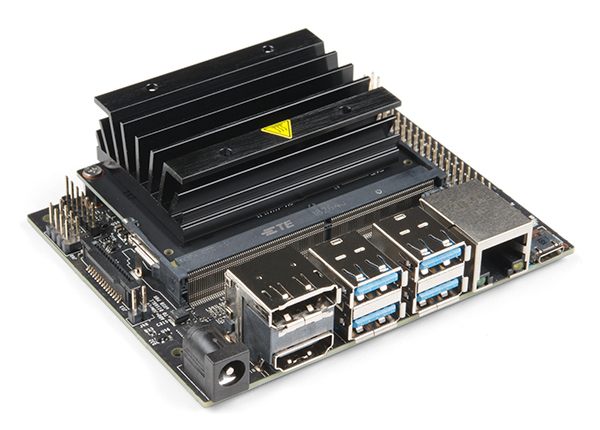
NVIDIA Jetson Nano Developer Kit with its black heatsink and row of USB ports
NVIDIA Jetson Nano Developer Kit. Photo: SparkFun Electronics, CC BY 2.0.

What it does

  • Blocks ads everywhere. Pi-hole filters ads and trackers at the DNS level, so every device on the network is covered, including phones, smart TVs, and consoles, with nothing to install on them.
  • Hosts my files. Nextcloud gives me a private Google Drive with a web UI and desktop and mobile sync, backed by a 500GB SSD.
  • Works from anywhere. Tailscale connects my devices over an encrypted WireGuard VPN, so all of it is reachable when I'm away from home.

The hardware

BoardNVIDIA Jetson Nano Developer Kit, 4GB
CPUQuad-core ARM Cortex-A57 @ 1.43 GHz
GPU128-core NVIDIA Maxwell
Memory4GB 64-bit LPDDR4
Boot drive16GB microSD
Storage500GB USB SSD
NetworkGigabit Ethernet, wired for reliability
Power draw~5W, running 24/7

How it fits together

Storage first

The Nano boots from a 16GB microSD card, which fills up fast. A 500GB USB SSD holds everything else: Docker images, Pi-hole data, and Nextcloud files. It mounts automatically at boot, and the Nano still starts normally if the drive is ever unplugged.

Docker for the services

Pi-hole and Nextcloud each run in their own container, with Docker's storage moved to the SSD. One Jetson-specific gotcha: the Nano's older 4.9 Linux kernel conflicts with Docker's default security (seccomp) profile, so containers need that profile relaxed to start.

Pi-hole

Ubuntu's built-in DNS resolver already uses port 53, so it has to step aside before Pi-hole can take over. My ISP router doesn't allow custom DNS, so I point each device at the Nano directly and keep a public resolver as a fallback in case the Nano goes offline.

Nextcloud

Nextcloud replaced an older Samba share. I moved the existing files into it, let it index them, and checked a sample of documents and photos before retiring the old share.

Tailscale

Tailscale needs no port forwarding or router changes, which makes it ideal behind a locked-down ISP router. Magic DNS gives the Nano a readable hostname with real HTTPS certificates, so I never type an IP address. Connections are peer-to-peer, so speed is limited mainly by my home upload bandwidth. The free plan covers up to 100 devices.

At a glance

ServiceRoleRuns in
Pi-holeNetwork-wide DNS ad blockerDocker
NextcloudPrivate cloud storage and syncDocker
TailscaleWireGuard VPN with Magic DNSHost

The verdict

For about $100 (board plus SSD), I have a quiet, always-on server that blocks ads on every device, serves my files over HTTPS, and is reachable from anywhere, with no port forwarding and no dynamic DNS.

Want the exact commands? The full step-by-step setup is in my what-i-use repository.

Contact

Let's connect.

Open to interesting problems in simulation, Python tooling and open source.

Based in Austin, TX.